Expona
Context-trained AI agent delivering noise-free, cost-efficient conversational intelligence


 expona
At 140 miles on the information super-highway, world was just whizzing by…. The adrenaline rush that I was experiencing was nothing that I had ever foreseen. This was AMAZING!!!! And just than an inaudible SCREECH and…sudden death!!!!! The application had suddenly died on me….For the mission critical application I was working with, the last thing I needed was a delayed response time…This was a deal-breaker! I could sense the client breathing down my neck and snarling at this abrupt HALT if this ever happened in Production!!!
I suddenly broke into a sweat…..my mind was running overtime to figure out the way to overcome this challenge NOW!!!! While researching on the response time issue, I stumbled upon the concept of local storage and client side caching ….. An inner voice whispered to me: “This is where the answer to my problem lies!” I started exploring the concept in-depth and that’s what I thought I should share with you.
Think Real –Time and Local storage is the way to go….make this your thumb rule and the response time issue will be “HISTORY”
While Local Storage sounds fancy and geeky, it really is nothing but storage available on client side which can be used by different browsers and native applications to store large amount of data (up to 5 MB), without affecting browser performance.
Real time applications like traffic updates, share-market updates and medical applications totally survive on the response time and cannot have a delay in response or data acquisition, which is when local storage comes into play. Local storage reduces the response time for these applications as it uses locally cached data.
These applications work on the concept of locality of reference which manage to capture the particular user centric data and store it in local cache. As a result, the response time is much faster. Every user displays a pattern while using any application. By using local storage, you can cache the data that is more frequently accessed by the user.
In my case, my client needed the response time for search results to be as near real-time as can be…. Typically, the users would enter the search string and with the insertion or deletion of each character, the search results would need to change instantly.
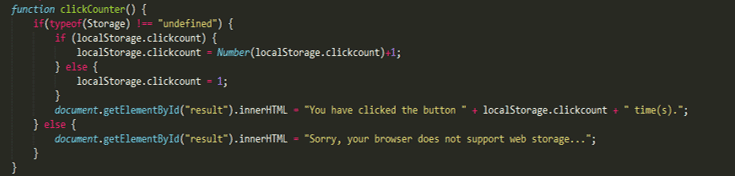
This function would store the number of times the user has clicked the button. Even when the session is closed, the click count is stored in the local storage, so that whenever the user starts the session, the click count is incremented from the last checkpoint, i.e. the count stored in the local storage.
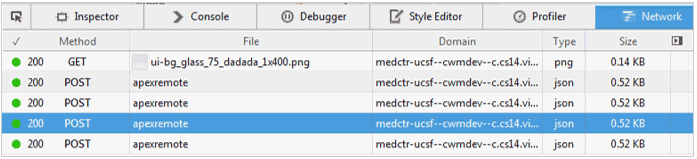
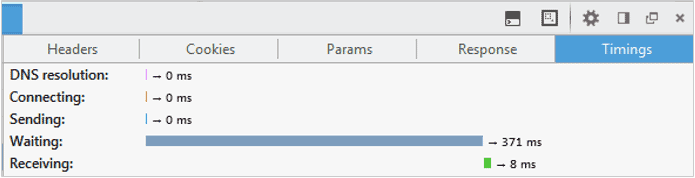
This time tracker displays the response time for key search in the application where local storage was implemented and we could see the response time being reduced substantially.
Local cache may not be a replacement for real server side storage, however, it can be used to speed up pages by caching results from API or by caching complex structures created by JavaScript. It can be used to cache data generated on client side or data that is used recursively by the client, hence resulting in a faster and efficient application for the user. Therefore, even though it is not a replacement for server side storage, it actually enhances it considerably.
All’s well that ends well…a happy client, a happy manager and a happy and a little more enlightened me…. Life couldn’t have been better…till I came across my next challenge!!!!

Context-trained AI agent delivering noise-free, cost-efficient conversational intelligence

We offer functional, technical, and implementation support, minimizing disruptions to your operations.

AI or Gen AI, consulting, development or model building. You ask for any of them. We will deliver.
Insights from our team of experts who deliver digital software day in and day out.
 Thank you for signing up!
Thanks a lot for your interest. You are already a subscriber. You will receive your first newsletter soon.