Expona
Context-trained AI agent delivering noise-free, cost-efficient conversational intelligence


 expona
In my previous post on Salesforce to Amazon integration using Signature Version 4, I had taken you through the process of creating a canonical request, which formed the first step for calculating a signature required for the integration. As promised, I am back with the remaining steps you will need to complete for integrating Salesforce with Amazon.
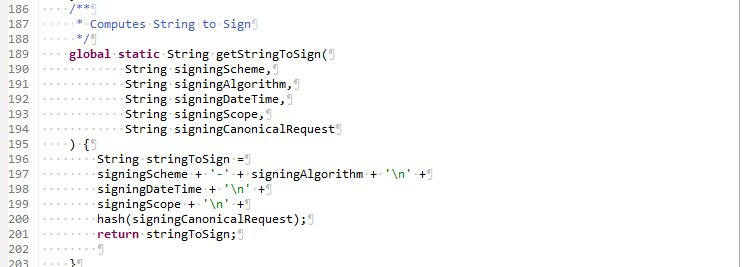
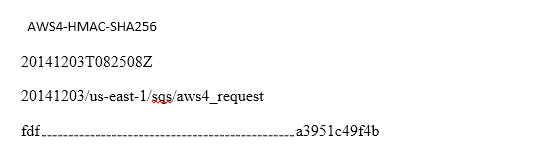
For calculating the signature, you need to derive the signing key from AWS secret access key. For deriving the Signing key, you need to create a series of hash-based message authentication codes (HMACs) using HmacSHA256AH algorithm for date, region, service. You can derive the signing key as given in the code snippet below:

The sign function used for creating the HMACs is as shown below:
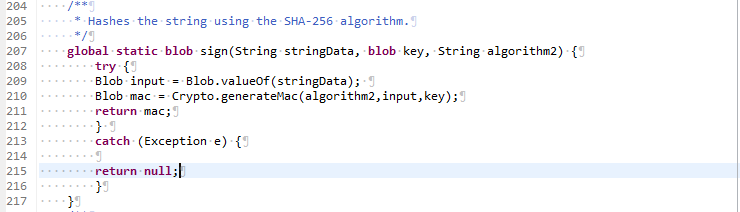
After creating the signature as a digest, convert it into a hexadecimal representation using EncodingUtil.convertToHex function. The final signature, after conversion to hex will look something like this:

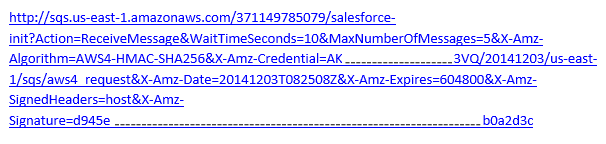
After the signature has been calculated, you need to add it to the query string. Query string will contain the action, the action parameters, and the signing information. This request is known as pre-signed URL and it is calculated as:

The following example shows what a request might look like when all the request parameters, including the signing information, are included in query string parameters.
While integrating Amazon with Salesforce using signature version 4, you need to bear the following in mind:
There! You are now ready to conquer the world, what with both Salesforce and Amazon data at your disposal at a single location, and why not, you have it covered A to Z after all.
Reference: http://docs.aws.amazon.com/general/latest/gr/sigv4_changes.html

Context-trained AI agent delivering noise-free, cost-efficient conversational intelligence

We offer functional, technical, and implementation support, minimizing disruptions to your operations.

AI or Gen AI, consulting, development or model building. You ask for any of them. We will deliver.
Insights from our team of experts who deliver digital software day in and day out.
 Thank you for signing up!
Thanks a lot for your interest. You are already a subscriber. You will receive your first newsletter soon.